大模型 Agent 实践
Agent = 一个能“自主决策 + 自主执行任务”的大模型系统,而不是简单对话的 LLM。
- 普通调用大模型:只有 LLM 单次回答
- Agent:让 LLM 具备“循环、自我反思、调用工具、规划任务”的能力 → 相当于一个小型 AI 程序
一、Agent 组成
1. LLM 思考(Reasoning)
LLM 不是直接回答,而是负责:
- 规划下一步做什么
- 选择需要的工具
- 分解任务
- 评估结果是否满足
- 决定是否继续循环
你会看到其 “思考链”(chain of thought),在真实系统中通常被隐藏。
- HTTP 请求
- 搜索引擎
- 数据库查询
- Python/JS 执行
- 文件系统操作
- 外部系统 API
LLM 并不直接执行,而是输出:
1
2
3
4
| {
"tool": "search",
"query": "Bitcoin price now"
}
|
3. 循环(Agent Loop)
任务开始 → 思考 → 调用工具 → 再思考 → 再调用工具 → 判断是否完成 → 输出最终答案
4. 记忆
- 过去任务结果
- 用户偏好
- 持久化信息(Vector DB)
- 短期工作记忆(类似 stack)
让 Agent 具备“一致性”和“长期性”。
二、常见场景
1. 场景一:查询天气
- 自动判断需要使用“天气查询工具”
- 自动调用工具
- 获得真实天气数据
- 整理成可读的回答
- 自动返回给你
2. 场景二:实现代码并上线
1
| 帮我写一个支持登录的聊天室,并部署到 Vercel。
|
模型可能会有如下几个步骤
- 分解任务
- 生成项目结构、代码
- 使用工具检查报错
- 调用 Vercel API 自动部署
- 测试功能
- 返回最终网址
三、实际动手做一个 Agent
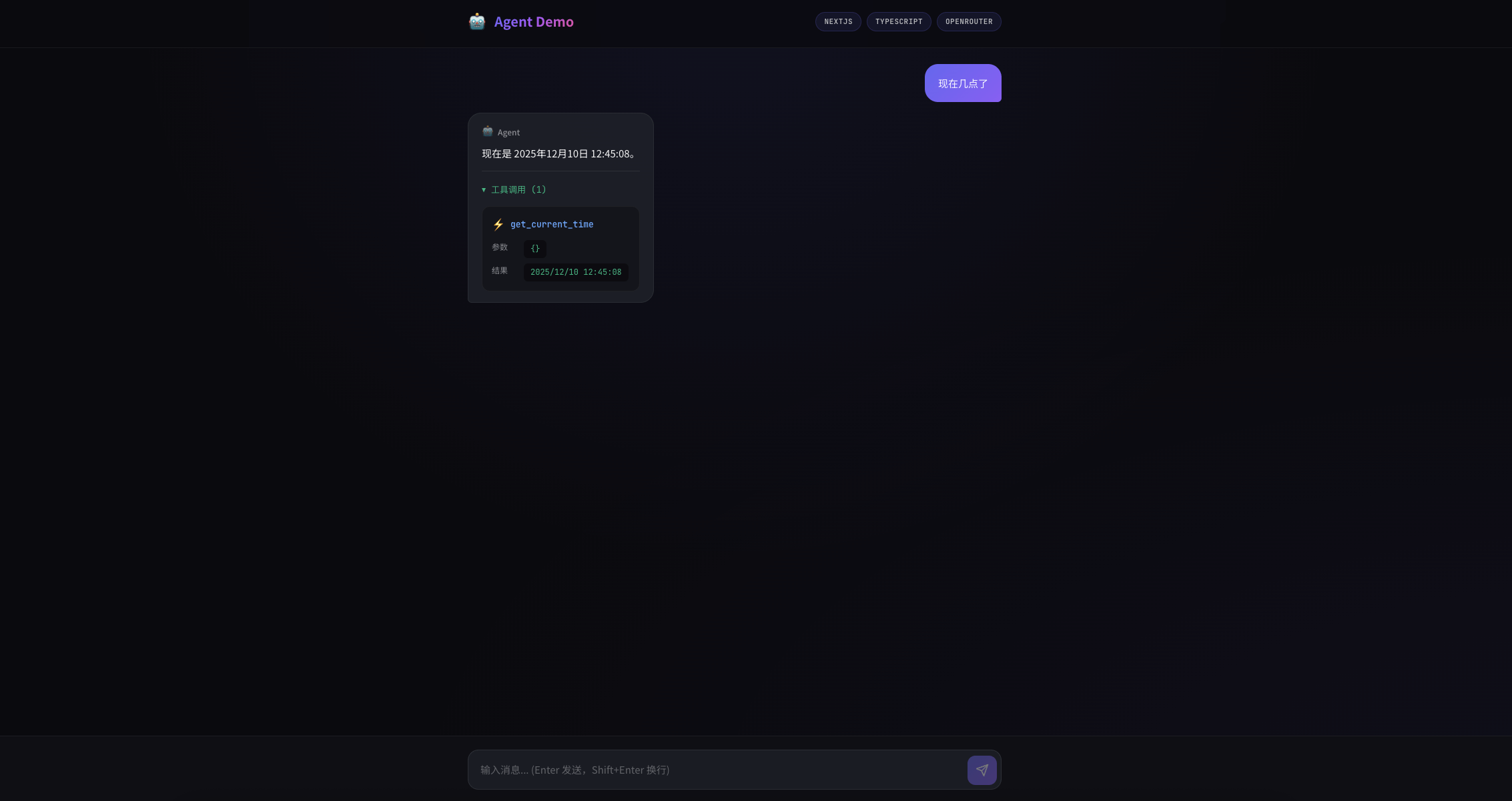
这里直接使用 NextJS 快速搭建一个
1. 界面
2. 项目结构
1
2
3
4
5
6
7
8
9
10
11
12
13
14
15
16
17
18
19
20
21
22
23
| agent-demo/
├── app/
│ ├── api/
│ │ └── chat/
│ │ └── route.ts # Chat API Route
│ ├── globals.css # 全局样式
│ ├── layout.tsx # 根布局
│ ├── page.tsx # 主页面
│ └── page.module.css # 页面样式
├── components/
│ └── chat/
│ ├── ChatMessage.tsx # 消息气泡组件
│ ├── ChatInput.tsx # 输入框组件
│ ├── WelcomeScreen.tsx # 欢迎页组件
│ ├── LoadingIndicator.tsx
│ └── index.ts # 组件导出
├── lib/
│ ├── agent.ts # Agent 核心逻辑
│ ├── tools.ts # 工具定义和实现
│ └── types.ts # TypeScript 类型定义
├── package.json
├── tsconfig.json
└── README.md
|
3. Agent 核心逻辑
核心就是不断循环调用大模型,然后大模型会根据用户传入的 Prompt 来判断是否需要调用工具,如果需要调用工具,会返回一个 tool_calls 数组,数组里面有需要调用函数的名称和参数,然后根据函数名称和参数执行对应的逻辑。
再将执行得到的结果再次传给大模型,循环往复,知道大模型认为没有需要调用工具位置,大模型会返回终止信号,这个时候就是最终结果。
3.1 运行 agent
1
2
3
4
5
6
7
8
9
10
11
12
13
14
15
16
17
18
19
20
21
22
23
24
25
26
27
28
29
30
31
32
33
34
35
36
37
38
39
40
41
42
43
44
45
46
47
48
49
50
51
52
53
54
55
56
57
58
59
60
61
62
63
64
65
66
67
68
69
70
71
72
73
74
75
76
77
78
79
80
81
82
83
84
85
86
87
88
89
90
91
92
93
|
async run(
userMessage: string,
history: ChatMessage[] = []
): Promise<AgentResult> {
const messages: ChatMessage[] = [
{ role: "system", content: SYSTEM_PROMPT },
...history,
{ role: "user", content: userMessage },
]
const steps: AgentStep[] = []
while (true) {
const response = await this.client.chat.completions.create({
model: this.model,
messages: messages as OpenAI.ChatCompletionMessageParam[],
tools: TOOLS as OpenAI.ChatCompletionTool[],
tool_choice: "auto",
})
const assistantMessage = response.choices[0].message
if (
assistantMessage.tool_calls &&
assistantMessage.tool_calls.length > 0
) {
messages.push({
role: "assistant",
content: assistantMessage.content,
tool_calls: assistantMessage.tool_calls.map((tc) => ({
id: tc.id,
type: "function" as const,
function: {
name: tc.function.name,
arguments: tc.function.arguments,
},
})),
})
for (const toolCall of assistantMessage.tool_calls) {
const funcName = toolCall.function.name
const argsString = toolCall.function.arguments || "{}"
const funcArgs = JSON.parse(argsString)
const step: AgentStep = {
type: "tool_call",
tool: funcName,
args: funcArgs,
}
if (funcName in TOOL_FUNCTIONS) {
step.result = TOOL_FUNCTIONS[funcName](funcArgs)
} else {
step.result = `未知工具: ${funcName}`
}
steps.push(step)
messages.push({
role: "tool",
content: step.result,
tool_call_id: toolCall.id,
})
}
} else {
const finalResponse = assistantMessage.content || ""
steps.push({
type: "response",
content: finalResponse,
})
return {
response: finalResponse,
steps,
}
}
}
}
|
3.2 工具函数定义(OpenAI Function Calling)
1
2
3
4
5
6
7
8
9
10
11
12
13
14
15
16
17
18
19
20
21
22
23
24
25
26
27
28
29
30
31
32
33
34
35
36
37
38
39
40
41
42
43
44
45
46
47
48
49
50
51
52
|
export const TOOLS: ToolDefinition[] = [
{
type: "function",
function: {
name: "get_current_time",
description: "获取当前的日期和时间",
parameters: {
type: "object",
properties: {},
required: [],
},
},
},
{
type: "function",
function: {
name: "calculator",
description:
"计算数学表达式,支持基本运算(+、-、*、/、^)和数学函数(sin、cos、sqrt、log 等)",
parameters: {
type: "object",
properties: {
expression: {
type: "string",
description:
"要计算的数学表达式,例如 '2 + 3 * 4' 或 'sqrt(16)' 或 '2^10'",
},
},
required: ["expression"],
},
},
},
{
type: "function",
function: {
name: "get_weather",
description: "获取指定城市的天气信息",
parameters: {
type: "object",
properties: {
city: {
type: "string",
description: "城市名称,例如 '北京'、'上海'",
},
},
required: ["city"],
},
},
},
]
|
3.3 工具函数实现
1
2
3
4
5
6
7
8
9
10
11
12
13
14
15
16
17
18
19
20
21
22
23
24
25
26
27
28
29
30
31
32
33
34
35
36
37
38
39
40
41
42
43
44
45
46
47
48
49
50
51
52
53
54
55
56
57
58
59
60
61
62
63
64
65
|
function getCurrentTime(): string {
console.log("【getCurrentTime】")
const now = new Date()
return now.toLocaleString("zh-CN", {
year: "numeric",
month: "2-digit",
day: "2-digit",
hour: "2-digit",
minute: "2-digit",
second: "2-digit",
hour12: false,
})
}
function calculator(expression: string): string {
console.log("【calculator】")
try {
const mathFunctions: Record<string, unknown> = {
sin: Math.sin,
cos: Math.cos,
tan: Math.tan,
sqrt: Math.sqrt,
abs: Math.abs,
round: Math.round,
floor: Math.floor,
ceil: Math.ceil,
log: Math.log,
log10: Math.log10,
pow: Math.pow,
PI: Math.PI,
pi: Math.PI,
E: Math.E,
e: Math.E,
}
const safeExpression = expression.replace(/\^/g, "**")
const func = new Function(
...Object.keys(mathFunctions),
`return ${safeExpression}`
)
const result = func(...Object.values(mathFunctions))
return String(result)
} catch (error) {
return `计算错误: ${error instanceof Error ? error.message : "未知错误"}`
}
}
function getWeather(city: string): string {
console.log("【getWeather】")
const weatherData: Record<string, string> = {
北京: "晴天,温度 15°C,空气质量良好",
上海: "多云,温度 18°C,有轻微雾霾",
广州: "小雨,温度 22°C,建议带伞",
深圳: "晴天,温度 24°C,适合户外活动",
杭州: "阴天,温度 16°C,体感舒适",
成都: "多云,温度 14°C,有小雨预警",
}
return weatherData[city] || `${city}:晴天,温度 20°C(模拟数据)`
}
|
总结
到这里一个 Agent 的简单实现就完成了,当然继续深入思考,还有很多需要优化的地方,比如:
- 安全性校验
- 数据持久存储
- 监控和可观测性
- 日志
- 告警
- 性能监控(响应时间、Token 消耗、错误率)
- 考量工具函数直接抽离成单独的服务,或者说 MCP,减少耦合